Render Mermaid diagrams directly in Slack
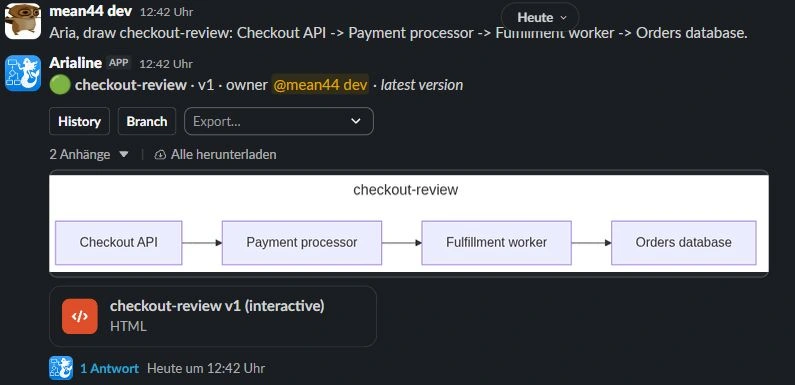
Slack doesn't render Mermaid. Paste a flowchart into a message and your team sees a wall of code. Arialine turns any Mermaid — pasted text, a fenced code block, or a shared .mmd file — into a rendered diagram posted right back into the thread, as an interactive HTML file and a PNG.
The problem with Mermaid in Slack
- Slack shows Mermaid as plain code — nobody reviews a diagram they can't see.
- Screenshotting your local Mermaid preview loses the source, so nobody can edit it later.
- Bots that render on a slash command post one static image with no memory: change the diagram and you start over.
- Slack escapes characters like > and & inside messages, which silently breaks arrows like -->> when you copy code back out.
How Arialine renders Mermaid in Slack
Paste it anywhere
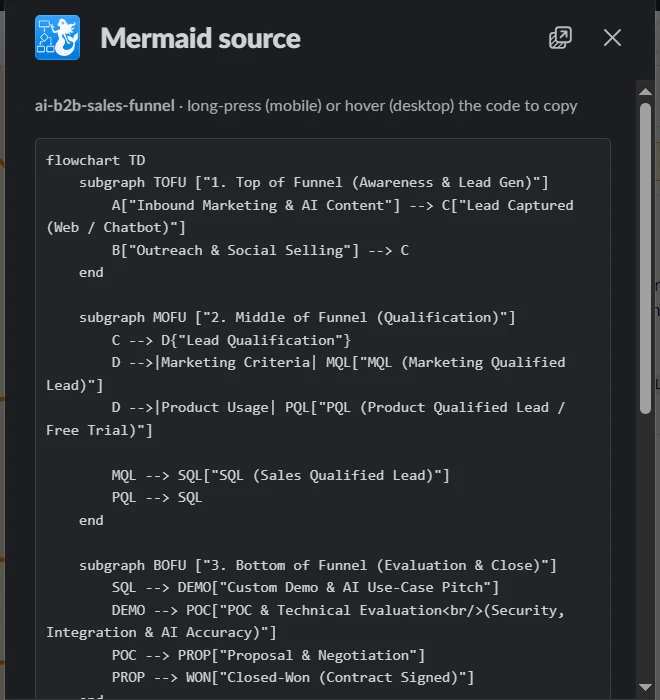
Fenced ```mermaid blocks, inline code, bare text with chatter around it, or a shared .mmd/.mermaid file — Arialine's extractor handles all of them and un-escapes Slack's HTML entities so arrows parse correctly.
Validated before it posts
Every diagram is validated by the renderer first. Broken Mermaid is auto-fixed by the AI (or offered a one-click fix card) — a broken diagram is never posted.
Interactive HTML + PNG, in the thread
You get a pan-and-zoom interactive HTML file on desktop and a PNG everywhere else. The source stays attached to the board, exportable as .mmd, PNG, or SVG at any time.
It stays alive
Reply in the thread to change the diagram — every edit becomes a new version with full history, not a new orphaned image.
Frequently asked
Do I need to know Mermaid syntax?+
No. You can also just describe the diagram in plain language — @arialine writes the Mermaid for you. Pasting existing Mermaid simply skips the AI and renders directly.
Which Mermaid diagram types are supported?+
Everything the Mermaid renderer supports: flowcharts, sequence diagrams, class diagrams, state diagrams, ER diagrams, and more.
Does rendering work if the AI model is down?+
Yes — valid pasted Mermaid renders directly without touching a model, so rendering works even during an LLM outage.
Related use cases
- Generate diagrams from plain language, inside Slack
- Interactive, zoomable diagrams as Slack files
- Turn Markdown files into native Slack Canvases
Try it in your workspace
Free for small teams. Arialine only joins channels you invite it to.
Add to Slack