Direct answer: Write the steps and decisions as Mermaid, then send the source through a Slack app that renders it. Use
/mermaidfor a one-off PNG; use/arialineand paste valid Mermaid when the team wants a board it can revise in the diagram thread. Before sharing, verify that each decision has an explicit outcome and that the paths match the process owners’ rules.
Slack’s message formatting supports code blocks, but ordinary Slack messages do not render Mermaid syntax as a diagram. Slack’s formatting guide describes message formatting; a renderer such as Mermaid Preview or Arialine turns the source into a visual.
Use a flowchart when the question is “what happens next?”
Flowcharts show steps and the branches between them. Choose the diagram type based on the question the reader needs answered:
| Reader’s question | Diagram that fits |
|---|---|
| What steps happen next, and which conditions change the path? | Flowchart |
| Which service sends which message, and in what order? | Sequence diagram |
| Which systems, containers, and boundaries are in scope? | C4 diagram |
| Which states can an object enter, and what triggers transitions? | Mermaid state diagram |
A flowchart is a poor place to hide unclear policy. Before writing Mermaid, state the process question in one sentence, name its start and possible end states, and agree what each decision tests. “Urgent?” is not a useful condition until the team defines what counts as urgent.
A support-escalation flowchart you can paste
This support flow covers triage through the first investigation outcome: a status response, an unconfirmed closure, an engineering handoff, or a return to support. It does not describe how engineering resolves a defect. Replace its conditions, owners, and outcomes with the rules your team has verified.
flowchart TD
    A[Customer reports checkout error] --> B{Known incident?}
    B -- Yes --> C["Share status; name the next-update owner and time"]
    B -- No --> D{Can the payments team reproduce it?}
    D -- Yes --> E[Assign a payments owner]
    D -- No --> F[Request redacted diagnostic details]
    F --> G{Issue reproduced?}
    G -- Yes --> E
    G -- No --> H[Close as unconfirmed and explain how to reopen]
    E --> P[Investigate the payment path]
    P --> I{Confirmed product defect?}
    I -- Yes --> J[Open assigned engineering issue and update customer]
    I -- No --> K[Return findings to support]
Read the branches in plain language:
- If an incident is already known, support shares its status, names who owns the next update, and says when it is due.
- Otherwise, support checks whether the payments team can reproduce the issue.
- If it can, an owner investigates whether there is a product defect; confirmed defects go to engineering, while other findings return to support.
- If the issue cannot be reproduced, support asks for redacted details. It either assigns an owner after reproduction or closes the case with a clear way to reopen it.
That text is also useful for accessibility and review. W3C guidance for complex images treats flowcharts as complex images and calls for a complete text equivalent. A Slack PNG by itself does not carry that explanation: keep the path summary next to the image, and do not assume readers can reach the Mermaid source.
Read the Mermaid syntax
The example uses the basic syntax documented in the Mermaid flowchart reference:
flowchart TDsets a top-down layout. UseLRwhen the process is wider than it is tall; Mermaid also supportsTB,BT, andRL.A[Action]gives nodeAan action label.B{Question?}draws a decision node.B -- Yes --> Clabels an arrow. Label both exits from a decision so readers do not have to infer what “no” means.- Node IDs such as
AandBare identifiers; the text inside the brackets or braces is what readers see. Keep labels short enough to scan in the rendered Slack image. - Put labels with punctuation in quotes, for example
A["Request logs (redacted)"].
Two syntax traps can make otherwise reasonable code fail: a node label containing lowercase end can break a flowchart, so use End or END; and a connected node ID starting with o or x can be parsed as a special edge marker. The Mermaid reference documents both cases. Prefer ordinary IDs and test the source in the renderer your workspace uses.
Check the logic before you render
A diagram that parses can still misstate the process. Review the source against these questions:
- Does every decision have all expected outcomes? If a question has more than two answers, label each branch or split it into clearer decisions.
- Does every path end, wait, or loop for a reason? If a retry or escalation loops back, show the owner and stopping condition. A dangling branch may mean the flow is incomplete.
- Are the conditions testable? Replace labels such as “bad request” or “high severity” with the actual rule or a link to where the rule is defined.
- Are handoffs visible? Name the team or role where ownership changes, especially if the next step depends on it.
- Is this one process at one level of detail? If it mixes customer actions, service internals, and incident policy, split it into connected views rather than shrinking the labels. See how to keep complex Mermaid diagrams readable.
A diagram is a map of an agreed process, not evidence that the software currently behaves that way. Verify code paths, production behavior, or policy in the system that owns them.
Render a flowchart in Slack
For a one-off PNG
Mermaid Preview’s Slack Marketplace listing describes the /mermaid command: paste the source and the app uploads a PNG to Slack. Its listing says the chart and PNG are not stored on its servers; the PNG remains in your Slack workspace. The project README describes a render-and-post workflow and lists editing an already posted diagram as a wishlist item. Choose this route when a picture in the channel is enough and the team is prepared to submit the source again for another render.
For a board the team will revise
Type /arialine, paste the Mermaid into the New diagram form, and choose Create. Valid pasted Mermaid renders as written without an AI model. By default the board posts a PNG and an interactive HTML file; channel settings can change which files are posted. See Arialine’s Mermaid workflow for the current steps.
If the diagram changes during review, address Arialine in the board’s thread. In the default proposal mode, an addressed change appears as a proposal; applying it creates the next version. Direct mode applies an addressed change immediately. Ordinary replies remain discussion. Arialine’s review guide explains the proposal and version flow.
Arialine’s security guide explains that a workspace owner or admin can turn off saving pasted Mermaid. In that case a valid paste renders once without being stored; /arialine privacy shows the current setting. The channel can also choose whether new board versions post a PNG, interactive HTML, or both.
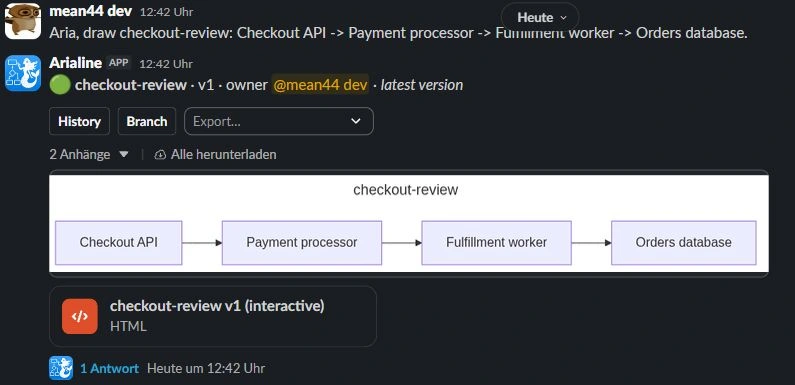
A separate sample board below shows the checkout flow from Checkout API through the payment processor and fulfillment worker to the orders database. It illustrates board output, not the support flow above.
If nobody has written Mermaid yet
Start from the process in ordinary language. For example:
Create a flowchart for checkout support. First check whether an incident is already known. If not, route by whether the payments team can reproduce the error. Show who owns each handoff and what happens when the issue remains unconfirmed. Do not invent an escalation rule.
With Arialine, a plain-language request uses the AI creation path; pasting valid Mermaid does not. Review the generated source and compare every branch with the people responsible for the process before treating it as a reference. The guide to creating Mermaid diagrams in Slack covers both input paths.
Flowchart rendering and sharing questions
Why does my Mermaid flowchart work in one app but not another?
Mermaid integrations may bundle different renderer versions, so syntax introduced in a later release may not parse everywhere. The example uses basic syntax. Mermaid marks its expanded node shapes as available from version 11.3; check the destination app’s renderer before using them. The Slack Mermaid troubleshooting guide also covers syntax, version, and app-setup checks.
What should I do if the chart looks cramped in Slack?
Try top-down (TD) for a long sequence and left-to-right (LR) for a short, wide path. Shorten labels, keep one audience and level of detail per view, and inspect the actual image at the size teammates will see it. There is no universal node-count limit: readability depends on label length, branches, layout, and display size.
Can I use a screenshot instead?
Yes. A PNG or other image can communicate a snapshot, but it does not carry editable Mermaid source or a version trail by itself. Keep the source somewhere the next editor can find it, or use a board workflow if changes will be reviewed in the Slack thread.

 Add to my Slack