Arialine vs Lucidchart

Arialine vs Lucidchart: choose the document you want to maintain

Lucid can generate and edit through an authorized Slackbot connector. Compare that Lucid-document workflow with Arialine's Mermaid board and source-linked Slack revisions.

Do you need a Lucid document, or a Mermaid board with a thread history?

Start with Lucidchart

Keep Lucid when its visual document and editing workflow are already your team's reference. Generation inside Slack is not exclusive to Arialine.

A review with Lucidchart

  1. Authorize the Lucid connection
  2. Connect Slackbot to your Lucid account
  3. Find, generate or edit permitted documents
  4. Open and maintain the document in Lucid

A review with Arialine

  1. Invite Arialine to the working channel
  2. Request a Mermaid diagram
  3. Review the published board
  4. Apply addressed revisions and revisit their context

A thread you can keep working in

From a first diagram to the reason behind a change

A real sandbox walkthrough: create checkout-review, review a retry-queue proposal, apply it as version 2, then inspect its recorded decision.

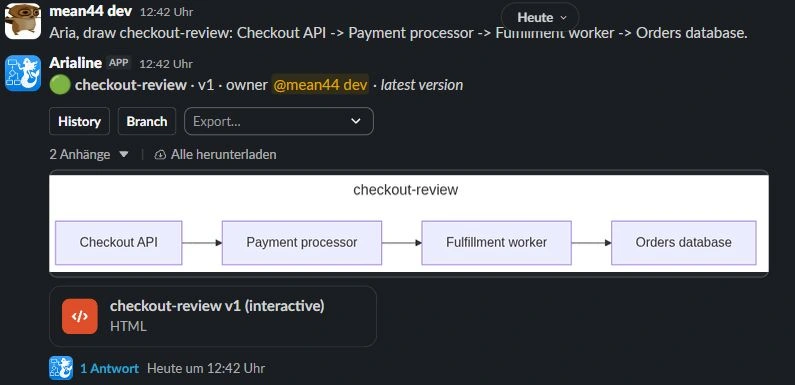
Aria, draw checkout-review: Checkout API -> Payment processor -> Fulfillment worker -> Orders database.

Arialine generates Mermaid and publishes a board with HTML and PNG artifacts in Slack.

Arialine diagram board and controls in a Slack thread
Actual sandbox product capture. The interactive HTML opens as a file; Slack mobile shows the PNG preview.
Read the complete example
  1. Create: Aria, draw checkout-review: Checkout API -> Payment processor -> Fulfillment worker -> Orders database.. Arialine generates Mermaid and publishes a board with HTML and PNG artifacts in Slack.
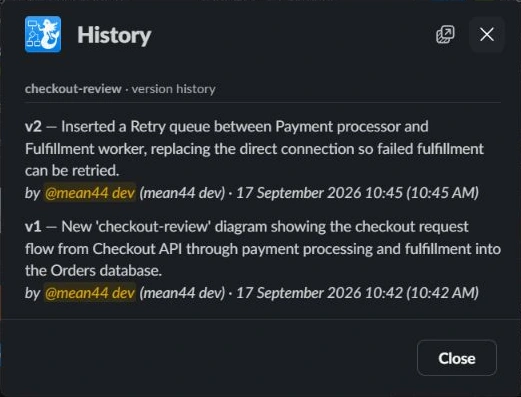
  2. Edit: Aria, propose a retry queue between Payment processor and Fulfillment worker so failed fulfillment can be retried.. An addressed thread edit produces a new version. In proposal mode, review and apply it first. Ordinary replies remain discussion.
  3. Trace: Open the published HTML file → Decisions → select Retry queue. Inspect the decision history. The diagram's decision view connects recorded changes to their source messages.

Try one flow before changing your team's tools

To evaluate Arialine alongside Lucid, choose a small accepted flow and provide its components and relationships. Review the Mermaid result with your team. A direct Lucid document import or automatic two-way sync is not a supported claim.

Setup, pricing and data tradeoffs

Lucid's documented Slackbot connector requires organizational Slack authorization and a user connection to a Lucid account; Team and Enterprise admins must enable the Lucid MCP server. Availability also depends on the Slack environment. Arialine's native board workflow is separate from its optional Slack AI/MCP path.

Arialine's Free plan includes all features with up to 3 boards and 10 AI generations per workspace each day. Team removes both limits. Compare current competitor plans and account requirements directly rather than assuming equal packaging.

Choose by source format, review process and the artifact you will keep updating. Arialine is not a freeform Lucid editor, and its AI-assisted output still needs human review.

Questions before switching

Can Lucid generate and edit diagrams from Slack?

Yes. Its official Slackbot connector documentation describes natural-language generation and document editing after the required authorization and account connection.

Is Arialine's differentiator just AI generation?

No. Evaluate the Mermaid source, stable board root, addressed thread revisions, retained versions and source-linked decision context together.

Does Arialine synchronize a Lucid document?

No direct import or automatic two-way synchronization was verified. Evaluate with a small flow you can describe and review independently.

Evidence and review date

Official sources reviewed September 17, 2026. Capabilities, account requirements and availability can change. Arialine mechanics were verified against its application implementation.