Arialine vs Mermaid Preview: render or revise diagrams?
Compare Mermaid Preview's /mermaid-to-PNG workflow with Arialine's editable source, addressed revisions, HTML artifacts and decision trail in Slack.
Do you need one render, or a board your team will keep changing?
Start with Mermaid Preview
Mermaid Preview is a focused option when you already have the code and want to share a render. Its Marketplace listing documents on-demand generation without retaining diagram source or PNG copies on its servers.
A review with Mermaid Preview
- Write your Mermaid source
- Run /mermaid in Slack
- Paste and preview the code
- Publish the PNG to the channel
A review with Arialine
- Supply Mermaid or describe the system
- Receive PNG and HTML board artifacts
- Request an addressed thread edit
- Retain the new version and source-message context
A thread you can keep working in
From a first diagram to the reason behind a change
A real sandbox walkthrough: create checkout-review, review a retry-queue proposal, apply it as version 2, then inspect its recorded decision.
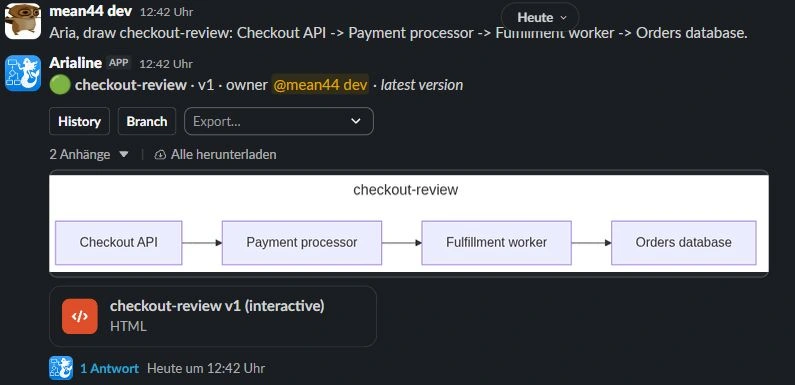
Aria, draw checkout-review: Checkout API -> Payment processor -> Fulfillment worker -> Orders database.
Arialine generates Mermaid and publishes a board with HTML and PNG artifacts in Slack.

Read the complete example
- Create: Aria, draw checkout-review: Checkout API -> Payment processor -> Fulfillment worker -> Orders database.. Arialine generates Mermaid and publishes a board with HTML and PNG artifacts in Slack.
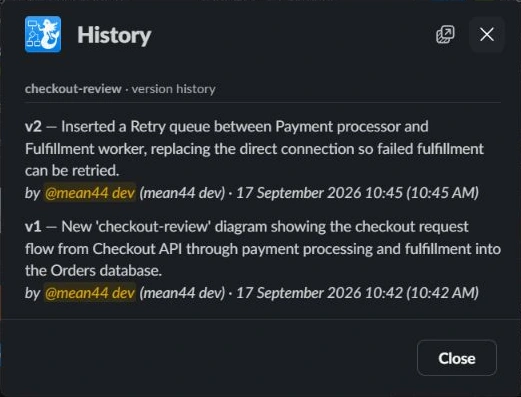
- Edit: Aria, propose a retry queue between Payment processor and Fulfillment worker so failed fulfillment can be retried.. An addressed thread edit produces a new version. In proposal mode, review and apply it first. Ordinary replies remain discussion.
- Trace: Open the published HTML file → Decisions → select Retry queue. Inspect the decision history. The diagram's decision view connects recorded changes to their source messages.
Try one flow before changing your team's tools
Your existing Mermaid is a useful starting point. Supply it to Arialine as a supported code block or .mmd file and use Render as diagram. Keep the original source, check the published result, then try one addressed change in the board thread.
Setup, pricing and data tradeoffs
Both workflows need their Slack app installed under your workspace's policies. Mermaid Preview documents a /mermaid modal and PNG publishing. Arialine also stores operational board source and history; review its Privacy Policy when evaluating that tradeoff.
Arialine's Free plan includes all features with up to 3 boards and 10 AI generations per workspace each day. Team removes both limits. Compare current competitor plans and account requirements directly rather than assuming equal packaging.
This comparison describes published workflows. It does not infer that every Mermaid renderer lacks editing or versioning. If all you need is a one-off image, additional board history may be unnecessary.
Questions before switching
Can I start with existing Mermaid?
Yes. Supply supported Mermaid source to Arialine and render it into a board. You do not need to start with an AI-generated diagram.
What does Mermaid Preview publish?
Its official listing describes pasting and previewing Mermaid through /mermaid, then uploading a PNG to Slack.
Which workflow should I test first?
Use a one-off render when the source is already maintained elsewhere. Test Arialine when the next diagram revision and the message behind it need to stay connected to a shared Slack board.
Evidence and review date
Official sources reviewed September 17, 2026. Capabilities, account requirements and availability can change. Arialine mechanics were verified against its application implementation.