How to create and edit Mermaid diagrams in Slack
Slack shows Mermaid as code. Here is how to turn it into a real diagram in the channel, from Mermaid you wrote or from a plain-language description, and how teammates edit it without starting over.

Slack does not render Mermaid. Paste a flowchart block into a message and your team sees code, not a diagram. This guide shows the two ways to get a real diagram into a Slack channel with Arialine, and how teammates change it later without redrawing it.
Direct answer: Install Arialine, invite it to a channel, then type
/arialine. In the New diagram form, either paste Mermaid (it renders exactly as written, without AI) or describe the diagram in plain language (Arialine writes the Mermaid). Arialine posts a PNG and an interactive HTML file in the channel. To change it, reply in the diagram's thread with@arialineand the change; each change becomes a new version.
Before you start: install in two minutes
- Click Add to Slack on arialine.app and approve the app for your workspace. Some workspaces need an admin to approve new apps.
- Invite Arialine to the channel where the diagram should live:
/invite @Arialine. - That's it. Arialine only reacts when you address it, so ordinary conversation in the channel is left alone.
Way 1: write the Mermaid yourself
Use this when you already have Mermaid in a README, a pull request or an old doc.
- Type
/arialinein the channel. The New diagram form opens with that channel selected. - Paste your Mermaid into the text box and press Create.
flowchart LR
  A[Checkout] --> B{Payment ok?}
  B -->|yes| C[Create order]
  B -->|no| D[Retry queue]
  D --> B
Arialine validates the code and renders it as written. No AI model is called, so this also works during an AI provider outage and does not use the Free plan's daily AI allowance.
You can also:
- mention
@arialinewith a fenced```mermaidblock in a message, - share a
.mmdor.mermaidfile (Arialine can build a board from it automatically; each channel can turn that off), or - use the Render as diagram message shortcut on an existing message.
If the code does not parse, Arialine either repairs it and says so in the thread, or shows a Let Arialine fix it button, depending on the channel's /arialine validate setting. A broken diagram is never posted silently.
Way 2: describe the diagram in plain language
Use this when nobody has written Mermaid yet.
Type /arialine and write a sentence instead of code, or mention Arialine in a message:
@arialine sequence diagram: the mobile app asks the API for a token, the API checks the session in Redis, falls back to Postgres on a miss, and returns a signed JWT
Arialine writes the Mermaid, validates it and posts the diagram. The generated source is not hidden: open Export → Show source to read or copy it, or export it as .mmd. Check the result before you rely on it; AI output can be wrong.
What you get in the channel
Arialine posts one board message:
- a PNG preview that everyone sees on desktop and mobile,
- an interactive HTML file with pan and zoom, plus panels for source, history and decisions,
- History, Branch and Export controls (
.mmd, PNG, SVG and PDF reports).
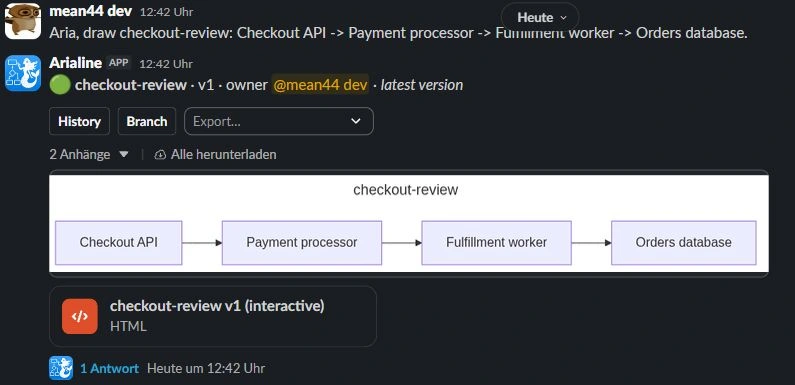
The board message always shows the latest version. Older versions stay in its thread.
Edit the diagram without starting over
This is where a Slack-native diagram beats a pasted screenshot. Reply in the board's thread:
@arialine add a fraud check between Checkout and Payment
Arialine edits the existing source rather than drawing a new picture. The change becomes version 2, with a one-line summary, a link to your message, and Undo and Rewind buttons. In channels set to proposal mode (the default), the change first appears as a proposal with Apply, Edit proposal and Dismiss; /arialine edits direct applies addressed edits immediately.
Teammates who don't know Mermaid can change the diagram the same way, in plain language. People who do can paste an updated block.
Which way should your team use?
| Situation | Use |
|---|---|
| You have Mermaid in a repo or doc | Paste it: /arialine → paste → Create |
| You are sketching a new flow in a thread | Describe it: @arialine + a sentence |
A .mmd file lives in the repo |
Share the file in the channel |
| The diagram will keep changing | Either, then edit in the thread |
FAQ
Does Slack support Mermaid natively?
No. Slack displays Mermaid as a code block. You need an app such as Arialine to render it. See does Slack support Mermaid? for the options.
Which Mermaid diagram types work?
Those supported by Arialine's bundled Mermaid 11 renderer: flowcharts, sequence, class, state, ER, Gantt, pie, user journey, timeline, mindmap, C4 and more.
Is it free?
Arialine's Free plan includes every feature with up to 3 boards and 10 AI generations per workspace per day. Rendering valid pasted Mermaid does not use AI generations. See pricing.

Try it in context
Bring Arialine into your Slack
Add Arialine, type /arialine, and paste the Mermaid you already have.
 Add to my Slack