
Engineers and tech leads

Architecture reviews in Slack

Turn a design review into a shared Mermaid diagram, review proposed edits, and keep the source message behind the accepted version.

Review the failure path while everyone can see the same diagram

In a checkout review, an engineer asks what happens when payment succeeds but fulfillment fails. Keep the question, the proposed queue and the accepted revision connected instead of posting another unexplained export.
1Establish the review scope

Supply the components you want to review

The result is a board with Mermaid source and published diagram files. Confirm the components and relationships before discussing changes.

# checkout-review
Maya Chen10:02 AM
@Arialine map checkout: API, payment processor and fulfillment worker

ArialineAPP10:02 AM

🟒 checkout-review · v1 · owner @Maya Chen · latest version
checkout-reviewCheckout APIPayment processorFulfillment workerOrders database
2Make the change explicit

Turn a review decision into an addressed request

Ordinary replies remain discussion. In proposal mode, inspect the proposal and apply it only after review. Edit proposal adjusts the plain-language request; applying it posts the new version to the thread.

Thread Β· checkout-review
Sam Rivera10:14 AM
@Arialine add a retry queue before the worker because fulfillment may fail after payment succeeds
ArialineAPP10:14 AM

πŸ“Œ Proposed change to checkout-review

Proposal: Add a retry queue between Payment processor and Fulfillment worker.

ApplyEdit proposalDismiss
3See what the accepted change adds

The diagram as reviewed, and the version the proposal publishes

Review question: does the queue make the failed-fulfillment path clear, and have you defined the retry and exhaustion behavior elsewhere?

Initial version

Checkout APIPayment processorFulfillment worker

Proposed version

Checkout APIPayment processorRetry queueadded in v2Fulfillment worker
4Review before applying

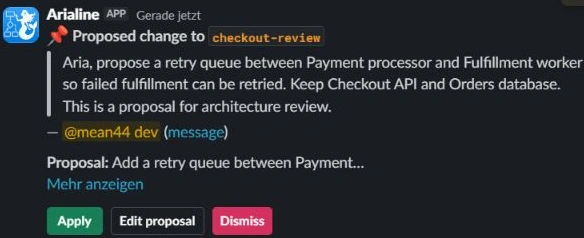
The proposal card, as it appears in Slack

Every proposal quotes the message it came from and who wrote it, so the reviewer judges the request itself β€” not a paraphrase.

Arialine review queue with proposal review controls
5Finish with an accepted reference

Close the review with a version you can point to

  1. 1Check the plain-language proposal against the intended design.
  2. 2Apply the accepted change, or edit/dismiss the proposal; then verify the generated diagram and Mermaid.
  3. 3Revisit the resulting version and the source request behind it.
  4. 4Record formal alternatives, consequences and ownership in your ADR or design document.

Try one real team workflow

Install in an approved workspace, invite Arialine to the channel, create a small board and review one addressed revision.