Arialine vs Miro: a Slack diagram thread or a visual workshop?
Compare Miro's board workflow with Arialine's Mermaid diagrams, addressed Slack edits, version replies and decision context. Choose by the artifact your team needs.
Are you facilitating a workshop, or reviewing a changing system?
Start with Miro
Keep a Miro board when spatial arrangement and freeform facilitation are central. Arialine does not replace a visual whiteboard or direct shape manipulation.
A review with Miro
- Create or open a Miro board
- Arrange and discuss the board
- Share its link and preview in Slack
- Continue maintaining the Miro board
A review with Arialine
- Describe a system or supply Mermaid
- Receive a board with PNG and HTML files
- Address Arialine in the board thread
- Review the new version and its source message
A thread you can keep working in
From a first diagram to the reason behind a change
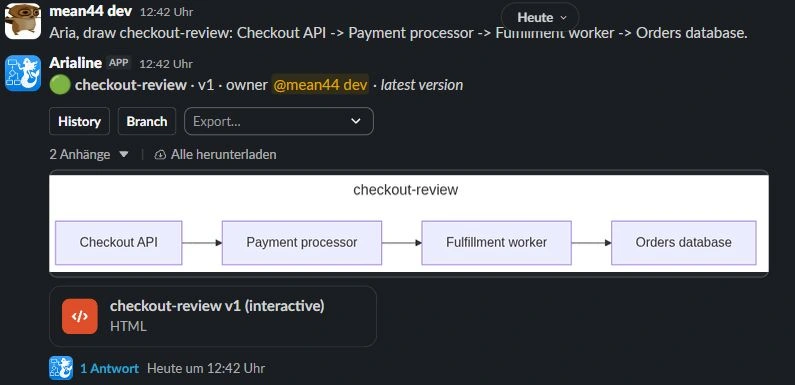
A real sandbox walkthrough: create checkout-review, review a retry-queue proposal, apply it as version 2, then inspect its recorded decision.
Aria, draw checkout-review: Checkout API -> Payment processor -> Fulfillment worker -> Orders database.
Arialine generates Mermaid and publishes a board with HTML and PNG artifacts in Slack.

Read the complete example
- Create: Aria, draw checkout-review: Checkout API -> Payment processor -> Fulfillment worker -> Orders database.. Arialine generates Mermaid and publishes a board with HTML and PNG artifacts in Slack.
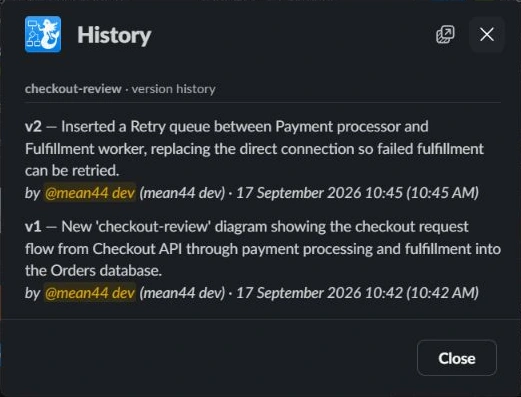
- Edit: Aria, propose a retry queue between Payment processor and Fulfillment worker so failed fulfillment can be retried.. An addressed thread edit produces a new version. In proposal mode, review and apply it first. Ordinary replies remain discussion.
- Trace: Open the published HTML file → Decisions → select Retry queue. Inspect the decision history. The diagram's decision view connects recorded changes to their source messages.
Try one flow before changing your team's tools
For a separate technical diagram, write the accepted components and relationships as Mermaid or a concise prompt. Create an Arialine board and review it before using it as your reference. There is no verified one-click Miro board importer.
Setup, pricing and data tradeoffs
Miro's Slack integration connects through a Miro profile and Slack authorization. It supports board creation, link previews, notifications and access actions. Arialine requires workspace app approval where applicable and an invitation to the working channel.
Arialine's Free plan includes all features with up to 3 boards and 10 AI generations per workspace each day. Team removes both limits. Compare current competitor plans and account requirements directly rather than assuming equal packaging.
A workshop and a diagram review can coexist. Neither tool choice proves the architecture is correct; the team must review the output and keep its accepted design current.
Questions before switching
Does Miro only post links to Slack?
No. Its documented Slack integration includes creating boards, previews, notifications and access actions. The distinction here is where the maintained artifact and review workflow live.
Can Arialine import my Miro board?
No direct Miro importer was verified. Start from Mermaid or a description of the accepted design, then review the generated board.
Should we replace every Miro workshop?
No. Keep the visual board for freeform workshops. Evaluate Arialine for a Mermaid diagram that changes through addressed Slack requests and needs a source-linked version trail.
Evidence and review date
Official sources reviewed September 17, 2026. Capabilities, account requirements and availability can change. Arialine mechanics were verified against its application implementation.