
An architecture review can lose its thread when a diagram, a question, and the requested change are scattered across Slack. A reviewer replies to a screenshot, someone posts a corrected copy, and nobody can tell whether it shows a proposal or the deployed system.
Direct answer: Post one diagram with a named scope and status, then ask a question reviewers can verify. Reviewers should check the elements, arrows, boundaries, and failure paths that matter to that question; cite the evidence they used; and turn each accepted finding into a clearly identified revision. Keep unresolved concerns visible and record why important alternatives were not adopted. A reviewed diagram describes a design; it does not prove that production matches it.
Set up a review that can reach a decision
- Choose one view and one question. A C4 system-context diagram about a boundary and a sequence diagram of one timeout scenario answer different questions. Do not ask reviewers to validate both levels at once. The C4 model's diagram guidance explains how its views separate system context, containers, components, and code.
- State what the picture represents. Label it as proposed, target, or deployed to a named environment. If the team calls it current, include the environment and the revision or verification time. A production view and a staging view can differ without either being mislabeled.
- Name the decision and the evidence. Ask “Does a payment timeout enter the retry queue before fulfillment?” rather than “Thoughts?” Link the contract, pull request, incident evidence, or decision record that can answer it. A renderer can catch syntax errors; it cannot establish that an edge matches the deployed behavior.
- Ask the right people to review the relevant slice. Include component owners for the path under discussion and a security reviewer when trust boundaries or sensitive data are involved. Keep the requested change attached to the diagram so later readers can follow the reasoning.
Slack threads keep replies attached to a specific message. Put the diagram in one message and use its thread for questions, evidence, and disposition. Reviewers can inspect the same artifact without searching a channel for competing screenshots.
Check whether the diagram communicates the right thing
Use this checklist for an architecture review (printable checklist). For C4 diagrams, the official C4 review checklist covers title, diagram type and scope, elements, and relationships. Microsoft's architecture diagram guidance also recommends clear directional arrows, meaningful relationship labels, a legend for line conventions, and a level of detail suited to the question.
- Scope and status: Does the title name the view and its scope? Is the state clear? Is the system boundary visible? Does the view avoid mixing a high-level context question with implementation detail?
- Elements: Are boxes or actors named and understandable? Is each one's type or responsibility clear? Include a technology name when the decision depends on it, and spell out acronyms that reviewers may not know.
- Relationships: Does each arrow point in the actual direction of a call or data flow? Label the purpose or protocol when the line is ambiguous. Distinguish synchronous calls from queued or asynchronous work, and explain dashed lines or other special notation in a legend.
- Failure and security paths: For the reviewed scenario, are timeouts, retries, dead-letter handling, external systems, and trust boundaries shown where they change the answer? Mark data classification when the flow crosses a relevant boundary.
- Evidence and ownership: Can a reviewer check important claims against the linked contract, code, configuration, decision, or runtime evidence? Is there an owner who will recheck the view when a relevant change lands?
The checklist is a prompt for the selected view, not a demand to draw every subsystem. Split a crowded diagram into context, component, or scenario views when one picture can no longer answer its question. The architecture diagram Definition of Done helps decide whether a code change should update a particular view.
Turn comments into explicit outcomes
For each finding, choose a disposition and leave it in the review thread:
- Apply a factual correction when the linked evidence supports it. Recheck the affected path after the edit.
- Discuss a claim that is ambiguous or lacks evidence. Keep it unresolved until the team finds the contract, owner, or runtime source that can settle it.
- Branch when two target designs are still viable. Compare them without replacing the current diagram.
- Reject an out-of-scope or unsupported suggestion with the reason. If the concern involves security, privacy, or data movement, keep the risk open until the appropriate reviewer resolves it; do not dismiss it just to make the review look complete.
For example, suppose a reviewer asks whether a payment timeout is retried through a queue or by a second synchronous call. Check the service contract or runbook first. If it specifies a queue and dead-letter path, update those relationships and ask the reviewer to verify the failure path. If no source establishes the behavior, record that uncertainty instead of drawing the more reassuring version.
Google's code review guidance asks reviewers to examine design, intended behavior, and edge cases, not just surface correctness. Applied to diagrams, a successful render or “looks good” comment is not a substitute for checking whether the represented behavior matches the evidence. When rejected alternatives need to be revisited later, a decision ledger can preserve the reason and the source discussion.
Keep the review tied to recoverable versions
A screenshot preserves an appearance. It does not retain an editable source or, by itself, show which review comment led to the picture. Use a version number when a ticket, decision, or incident needs an exact snapshot, and link the live diagram when readers need the latest state.
| Operation | What it does | Review boundary |
|---|---|---|
| Inspect | Shows an earlier version | Does not change the current diagram |
| Undo | Reverses one version's change set while preserving later changes | Undoing an older edit may need AI and can be refused when edits cannot be separated |
| Rewind | Creates a new current version from an earlier source | Later versions remain in history but are no longer current |
| Branch | Starts a separate diagram from a source version | Leaves the original diagram unchanged |
Keep the disposition next to the version: accepted change, open risk, or rejected alternative. The revision shows what the diagram says now; the source discussion explains why it changed.
How Arialine handles this workflow in Slack
Arialine's Slack workflow guide describes how a diagram lives on a Slack root message, with later version replies in that message's thread. In the default proposal mode, an addressed edit request creates a card with Apply, Edit proposal, and Dismiss. Applying creates a numbered version. The version reply includes a summary and, when available, a link to the message that prompted the change; Undo and Rewind versions may have no source-message link. The History dialog lists the 20 most recent versions with their summaries, authors, and times. Earlier version replies remain in the same Slack thread. Ordinary replies remain discussion unless they explicitly address Arialine with an edit request.
Proposal mode is a review step, not a strict approval gate: it does not restrict Apply to the diagram owner or record formal sign-off. Use your organization's required approval or decision record when a diagram needs authorized acceptance. Plan limits matter for long-running reviews: Free includes eight versions per board. At v8 the board stays readable and its history, decisions, source, and exports still work, but new edits, proposals, Undo, and Rewind require Team; check Arialine's current version limits before routing high-volume work through one board. In direct mode (/arialine edits direct), addressed edits apply immediately. When a non-owner applies a versioned edit, the board owner normally receives a Slack DM unless owner alerts are muted; delivery is best-effort.
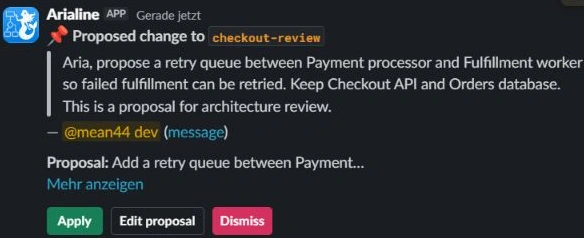
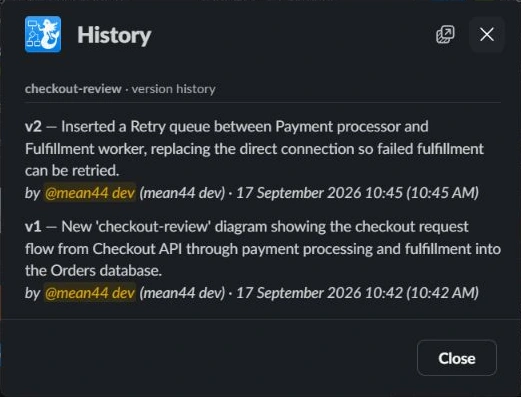
The screenshots show Arialine’s proposal card and recent-version list, including the controls for reviewing an edit and inspecting the board’s history.
For why state labels matter when diagrams describe software, see why architecture diagrams drift.
FAQ
Does clicking Apply mean an architecture decision was approved?
No. Apply accepts a proposed diagram edit and creates a version.
Where can I see what prompted a version?
Open the version reply in the diagram's Slack thread. It contains the change summary and, when available, a link to its source message; Undo and Rewind versions may have no source-message link. The History dialog shows the 20 most recent version summaries, authors, and times; earlier version replies remain in the thread.
Does reviewing a diagram prove that it matches production?
No. Review can check a diagram against evidence, but the claim remains bounded by the environment, revision, logs, configuration, or contract that reviewers inspected. Label the state and evidence so readers know what the review actually verified.
Will any reply in a diagram thread change the diagram?
No. Ordinary replies stay discussion. An edit requires a message that explicitly addresses Arialine with a diagram change request; in proposal mode the request appears as a card before it is applied.

 Add to my Slack