A reviewer sees a retry queue between a payment processor and a fulfillment worker. The diagram shows the new path, but not whether it is a proposal, an accepted target design, or a change already deployed.
Direct answer: A diagram change ledger is a versioned record of edits to a diagram. It should show what changed, when, and which request or discussion is linked to that change when the source was captured and retained. It helps readers trace the diagram’s history. It does not, by itself, record a team’s formal decision or prove that the depicted design was implemented. Use an Architecture Decision Record (ADR) for a consequential architecture choice that needs context, a decision, and consequences; link the ADR to the diagram version it explains.
Diagram change ledger vs. ADR
“Decision log” can mean different things. AWS uses it for the collection of ADRs produced by a team’s ADR process. In this guide, a diagram change ledger means the narrower history of edits to one diagram. Naming the two records separately makes it harder to treat a diagram revision as proof that a decision was accepted.
| Record | What one entry covers | What it helps answer | What it does not establish |
|---|---|---|---|
| Diagram change ledger | One diagram change or version: a summary, version identifier, author and date, plus links to the request or supporting discussion when recorded | What changed in this view, and where can I inspect the related discussion? | Whether the team accepted the architecture, why it chose the design over alternatives, or whether the design shipped |
| ADR | One architecturally significant choice, with context, decision, consequences, and often alternatives and status | Why did the team choose this option, what did it give up, and is the decision still in force? | That the implementation matches the decision |
| ADR index or decision log | A collection of ADRs, usually with titles or status information | Which significant choices has the team recorded? | The detailed history of every diagram edit |
The AWS ADR process describes an ADR collection as a decision log and says an ADR should capture context, the decision, and consequences. Microsoft’s ADR guidance also recommends recording options, trade-offs, and a status such as Proposed, Accepted, or Superseded. The ADR community’s template guide shows that teams can choose different formats, including templates that make alternatives and pros and cons explicit.
A version history and an ADR therefore solve related but different problems. A ledger can point to the conversation that accompanied a change; an ADR is where a team records its rationale and decision status in a durable, reviewable form. If a consequential choice changes, keep the accepted record intact and write a new ADR that supersedes it, as the Microsoft guidance on maintaining ADRs recommends.
Example: tracing a retry-queue change
Suppose the current flow is:
flowchart LR
  API[Checkout API] --> P[Payment processor]
  P --> W[Fulfillment worker]
  W --> DB[Orders database]
A request asks to insert a retry queue between the payment processor and worker so failed fulfillment attempts can be retried. The revised view becomes:
flowchart LR
  API[Checkout API] --> P[Payment processor]
  P --> Q[Retry queue]
  Q --> W[Fulfillment worker]
  W --> DB[Orders database]
A useful ledger entry ties the visible edit to its exact version and context. It might say that version 2 added a retry queue and rewired the fulfillment path, name the people and time recorded for the change, and link the request or supporting discussion if those Slack messages were captured. One version can contain more than one operation: the example below shows separate “add” and “rewire” changes attached to version 2.
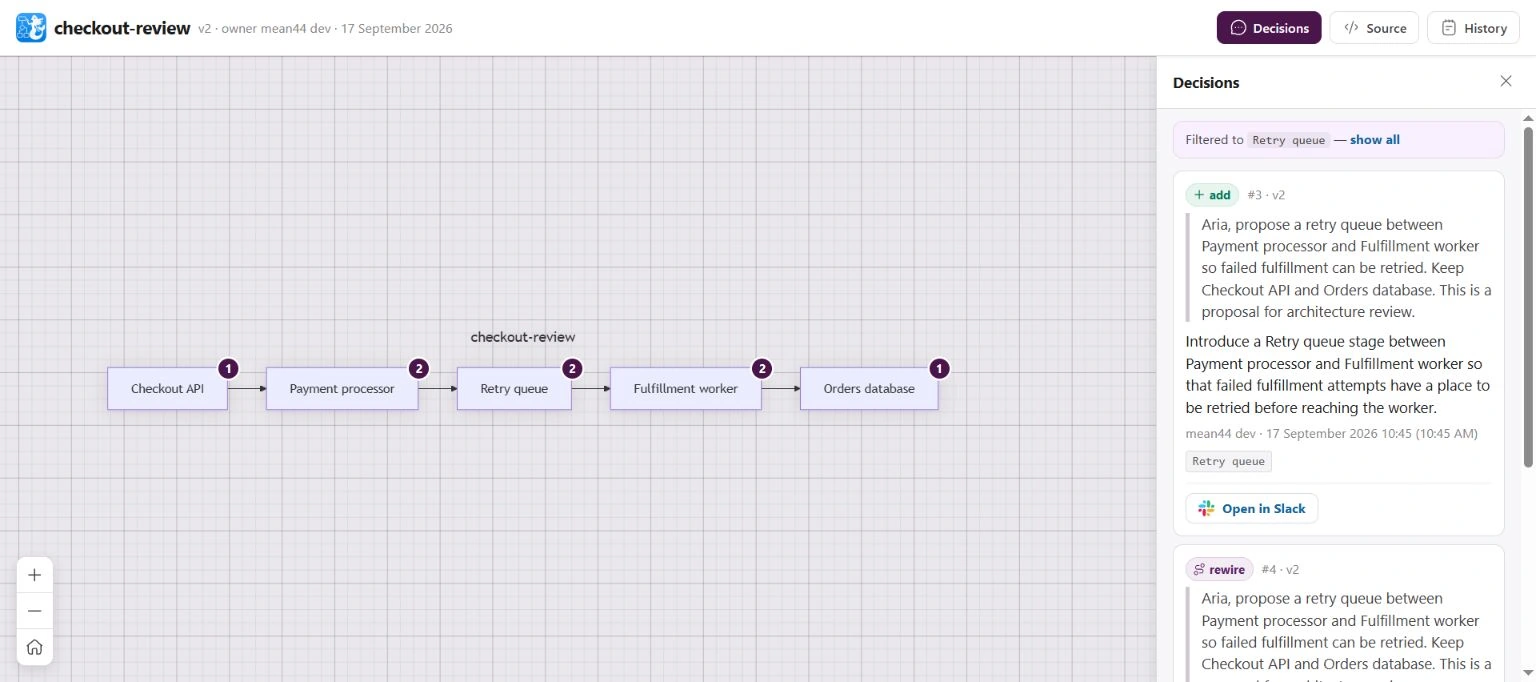
The screenshot shows Arialine’s Decisions panel for an example checkout flow. The linked message records the requester’s words; record architectural approval in the team’s designated decision system.
What a useful ledger entry should include
Keep the entry short enough to scan, but complete enough to locate and evaluate the change. A team designing its own ledger can use these fields:
| Field | Record | Why it matters |
|---|---|---|
| Diagram and version | A stable board or file identifier and the exact version | Readers can compare the before and after views |
| Change | The elements, relationship, or labels changed, summarized in one sentence | The entry explains the visual difference rather than repeating a generic “updated diagram” |
| People and time | Who requested the edit, who applied or committed it, and when | A requester, editor, decision owner, and approver may be different people |
| Source context | A permalink or durable reference to the request and any supporting messages, when available | Readers can inspect what was actually said instead of treating a generated summary as the full rationale |
| Decision state | A link to the ADR or decision record and its status, if the change expresses a consequential choice | A board edit and an accepted decision remain distinct |
| Implementation evidence | A pull request, deployed revision, configuration, or runtime reference when the diagram claims to show a real environment | Reviewers can check a deployment claim against the appropriate source |
For a diagram used to discuss a target design, label it as proposed or accepted target state according to the team’s process. For a diagram that claims to show production, name the environment and the evidence used to check it. A version number or “updated today” label says when the file changed; it does not say which system state the drawing represents. The guide to preventing architecture-diagram drift goes deeper on matching system claims to evidence.
Do not mark an editor as the decision-maker merely because they applied the change. In a tool with proposal review, “proposal applied” means the diagram was changed. A formal approval requires a separate action and record under the team’s decision policy.
When to write an ADR as well
Not every label correction or layout adjustment deserves an ADR. Write one when a choice materially affects system structure, an important quality attribute such as security or availability, a dependency or interface, or a decision that would be costly to reverse. AWS lists those kinds of choices in its ADR scope guidance; Microsoft similarly recommends recording alternatives and trade-offs for architecturally significant requirements.
For the retry-queue example, an ADR may be appropriate if the team is choosing between synchronous retries, a queue, and a dead-letter path, and the choice affects order guarantees, latency, or recovery responsibilities. The diagram should show the chosen path; the ADR should explain why the team chose it and what failure behavior or operating cost it accepted. Link the records in both directions where possible:
- The ledger entry points to the accepted ADR.
- The ADR identifies the diagram and version that illustrates the decision.
- A later change creates a new diagram version and, if the underlying decision changes, a new ADR that supersedes the earlier one.
This keeps the current picture easy to scan while preserving the reasoning that would be lost in a one-line change summary. For the wider set of artifacts, see the guide to minimum viable architecture documentation.
Treat links and summaries as evidence with limits
A source link makes a discussion easier to find, but its meaning is narrow. A message can support the claim “this person requested a retry queue on this date.” By itself, it cannot show that the team agreed, that an authorized approver signed off, or that the queue was deployed.
| Claim someone wants to make | Useful evidence | What that evidence still may not show |
|---|---|---|
| “The diagram changed” | The version history and its recorded change | Whether the edit is technically correct |
| “This change was requested” | The captured Slack message or thread | Team agreement or final decision status |
| “The team accepted this design” | An accepted ADR or the team’s designated approval record | That code and configuration now match it |
| “Production uses this path” | The deployed revision and configuration; runtime evidence when behavior depends on traffic or conditions | Why that implementation was chosen |
Slack access and retention settings also affect whether a source remains readable. Keep the durable rationale in the ADR or another designated record when the decision matters, rather than relying on a message permalink alone. See the Slack retention guide for architecture knowledge and the article on keeping architecture decisions out of Slack DMs.
How Arialine’s ledger works in Slack
Arialine is useful when the diagram review happens in a Slack conversation. A person can explicitly request a Mermaid diagram or edit, and the board keeps version history. The interactive view can show recorded changes for a selected element and open captured Slack source messages when available. A board version can distinguish the invocation request from supporting discussion, so a source link is not necessarily the message that contained every part of the rationale.
When a channel uses proposal review, a proposed change stays separate until someone applies it. Applying the proposal publishes a diagram version; it is not, by itself, formal architecture approval. A team that needs an approval record should keep it in the system named by its policy. See the architecture review workflow.
Arialine’s automatic ledger mirror is on by default. It creates a managed standalone Canvas where Slack permits it. Slack’s Canvas page says Free teams can use Canvases in channels, while paid teams can create unlimited Canvases. On Slack Free, Arialine keeps the ledger in the board’s thread instead of using a standalone Canvas or taking over a channel tab. The /arialine ledger off|on command controls future mirrors; turning them off does not erase stored board history.
Keep the repository or operational system authoritative for those claims, and make the handoff from Slack explicit.
Does every diagram edit need an ADR?
No. Use the ledger for routine traceability. Write an ADR when the change represents a significant architectural choice that the team needs to explain, review, and preserve.
Does applying a diagram proposal mean the architecture was approved?
No. It means the proposal was applied to the board and a diagram version was created. Record architectural approval separately if your process requires it.
Can a ledger reconstruct decisions from old Slack threads?
Only if the messages were captured and remain accessible. A ledger does not automatically rebuild the history of boards or decisions that predate it.
Next step: Pick one recent diagram change. Check that its version identifies what changed, its source link supports only what the message actually says, and any consequential choice points to the ADR or approval record.

 Add to my Slack