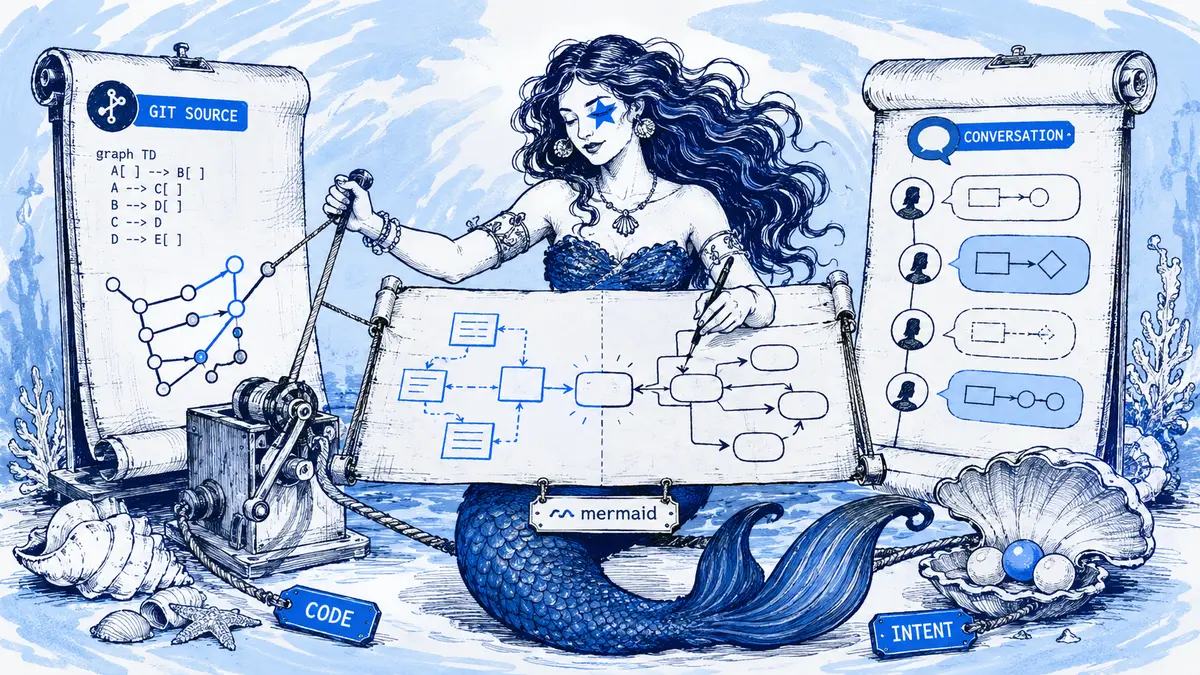
A repository's Mermaid diagram shows the deployed queue. In Slack, the team is discussing a proposal to replace that queue. An infrastructure-generated view still shows the existing deployment. Which picture is “right”? All three may be honest if they state whether they describe deployed state, intended design or observed infrastructure. Diagrams as code keep editable source beside implementation; generated diagrams derive a view from another system; conversation-led diagrams retain the discussion behind a proposed or accepted change. The useful choice is not one tool forever. It is clear authority and a deliberate handoff when a proposal becomes real.
Direct answer: Use diagrams as code when the diagram belongs with a repository and should change through pull requests. Use generated diagrams for observed structure: what actually calls what. Use conversation-led diagrams when the hard part is capturing review, alternatives, and decisions where the team talks. Most teams benefit from a hybrid in which each question has a clear authoritative source, and accepted conversation-led versions are exported into the repository deliberately.
Three approaches compared
| Diagrams as code | Generated from systems | Conversation-led | |
|---|---|---|---|
| Shows | Intended structure, as written by engineers | Observed structure: dependencies, resources, calls | Intended structure plus why it changed |
| Changes via | Pull requests | Re-generation | Requests in the discussion thread |
| Strength | Diffs, code review, lives next to code | Accurate, no manual upkeep | Low friction; captures decisions and alternatives |
| Weakness | Reasoning scattered across PRs and chat; non-engineers rarely review | Unreadable "hairballs"; no intent or reasons | Can drift from implementation; needs export for repo workflows |
| Authority for | "What is the documented design?" | "What runs in production?" | "What did we decide, and why?" |
Diagrams as code
Text formats can live beside code, go through review, and render in documentation. GitHub, for example, renders Mermaid in Markdown. The repository supplies permissions and an audit trail. This is the right home for engineer-owned diagrams tied to one codebase.
What it does not capture: the conversation. Product, operations, and adjacent teams often review in Slack rather than in the pull request, so the accepted reason for a change can be scattered even when the file is perfectly versioned.
Generated diagrams
Static analysis, manifests, infrastructure-as-code, service catalogs, and tracing can reveal components and relationships precisely. They are ideal for inventories, dependency analysis, and spotting unexpected runtime calls in systems that change too fast for hand-drawn low-level views.
What they cannot do: explain why a queue exists, which team owns a boundary, which alternative was rejected, or what the target state is. A complete generated graph is often too dense to read. Filter it by domain, request path, or risk question.
Conversation-led diagrams
Keeping the diagram in the discussion shortens the distance between feedback and revision. A reviewer writes "move fraud before authorization" in the thread, and the diagram changes with a link back to that message. This fits design reviews, incident follow-ups, and cross-team coordination.
What it does not replace: repository controls, code-linked automation, or portability. You need exports and an explicit rule about where edits happen.
Compare intended and observed state
The most useful practice is comparing the curated (intended) view with the generated (observed) one:
- an intended dependency that does not exist in code;
- an observed dependency that is not in the design;
- a deprecated component still receiving traffic;
- an ownership or boundary mismatch;
- an implementation compromise that was never recorded as a decision.
Each difference becomes a review item instead of silent confusion. Do this after major changes, during architecture reviews, and when an incident reveals a surprise dependency.
Decide which version wins after a discussion
Suppose a repository holds a Mermaid deployment diagram, while a Slack review proposes moving a worker to a new queue. The repository describes what is deployed today; the conversation describes a proposed change. Treating both as equally current creates a contradiction. Mark the Slack view as proposed, review the edit, then update the repository in the pull request that makes the deployment real. The source code and infrastructure remain the evidence for the deployed state.
Use Arialine for the Slack design discussion because its board can keep proposals, addressed edits and the messages behind versions together. Export the accepted Mermaid source to Git when the repository owns the production view. That handoff must be explicit: link the PR to the accepted diagram version and close the proposed status after deployment. GitHub's Mermaid support makes the same text renderable in the repository.
A hybrid model with explicit authority
- Explore and review the diagram in the conversation.
- Accept a version and record the decision.
- Export the accepted Mermaid source into the repository.
- Link the pull request back to the accepted version.
- Decide, and write down, where later edits start: the thread, Git, or either with reconciliation.
Avoid independent copies that drift apart silently. Authority can also change by stage: during design the thread is where review happens, and during implementation the repository becomes authoritative for the source. Say when that switch happens.
Where Arialine fits
Arialine is a conversation-led tool for Slack. Boards are created from pasted Mermaid or a description, revised by addressed requests in the thread, and versioned with links to source messages. Export gives you the .mmd source to commit, and PNG, SVG, or PDF for docs. There is no automatic Git sync. Moving accepted source into a repository is a deliberate step, which keeps the "where do edits happen?" rule clear.
For observed-state views, compare generated output with the board.
Whichever system owns the current view, use a repeatable diagram review process before treating a change as accepted.
How to choose by authority, effort and cost
This comparison is based on the record each workflow can make authoritative, not on a claim that one approach wins universally. Repository-based diagrams inherit the team's existing Git review and hosting costs. Generated diagrams add whatever scanner, catalog or observability tooling produces them. Conversation-led tools add a collaboration layer; Arialine is $79 per workspace per month on Team, while manual Slack-to-repository export remains a maintenance step.
- Choose diagrams as code when a repository is the source of truth and reviewers already work in pull requests.
- Choose generated diagrams when the question is what actually exists or communicates at runtime.
- Choose conversation-led diagrams when review and rationale happen in Slack and must be captured before they disappear.
- Use the hybrid when intent, observed state and accepted source all matter; name the authority for each.
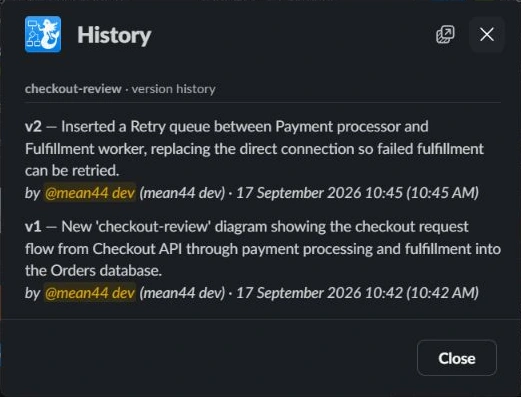
Arialine's version list with restore controls.
FAQ
Can both Slack and Git accept edits?
Yes, but you need a merge policy and someone who reconciles differences. Smaller teams should choose one edit path at a time.
Should generated diagrams replace hand-maintained ones?
Replace hand-maintained low-level inventories when generation is reliable. Keep curated views for intent, communication, and decisions.
Should non-engineers edit Mermaid source?
They can propose changes in plain language. An engineer, or a tool that validates the source, keeps the syntax valid.

 Add to my Slack